Python for Beginners: Basic Concepts with Examples
In this Python course for beginners, you'll learn to write your first Python program and set up your development environment step-by-step with working examples.
Python is a modern and versatile programming language used in a wide variety of applications, from web development to data analysis and artificial intelligence. It's known for its clear and readable syntax, making it an excellent choice for beginners. Throughout this tutorial, we'll explore the fundamentals of Python, including variables, data types, control structures, and functions.
Hello World and Development Environment
To start writing our first Python program, we need to install Python on our system. You can download it from the official Python website: python.org/downloads
To verify that Python is installed correctly, open a terminal or command prompt and type:
python --version
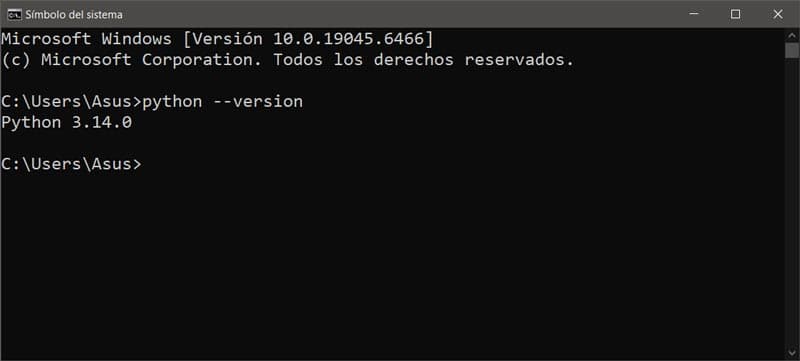 Terminal showing the installed Python version
We also need a development environment to write and run our code. You can use a simple text editor like Notepad or an integrated development environment (IDE) like Visual Studio Code, PyCharm, or Jupyter Notebook.
You can download Visual Studio Code from code.visualstudio.com/ and PyCharm from jetbrains.com/pycharm/download/.
 Visual Studio Code Interface
Once you have Python installed and a development environment set up, you can create a new file with the .py extension and write your first program. In Visual Studio Code, to create a new file, click "File" > "New File" and then save the file with a name like hello_world.py. Then, you can write the following code in your file:
print("Hello, world!")
This program simply prints "Hello, world!" to the console. To run it, save the file and then execute it from the Visual Studio Code terminal or the command prompt. To open the built-in terminal in Visual Studio Code, you can use the keyboard shortcut Ctrl + ~ or go to "View" > "Terminal". Then, navigate to the directory where you saved your hello_world.py file and run the following command:
python hello_world.py
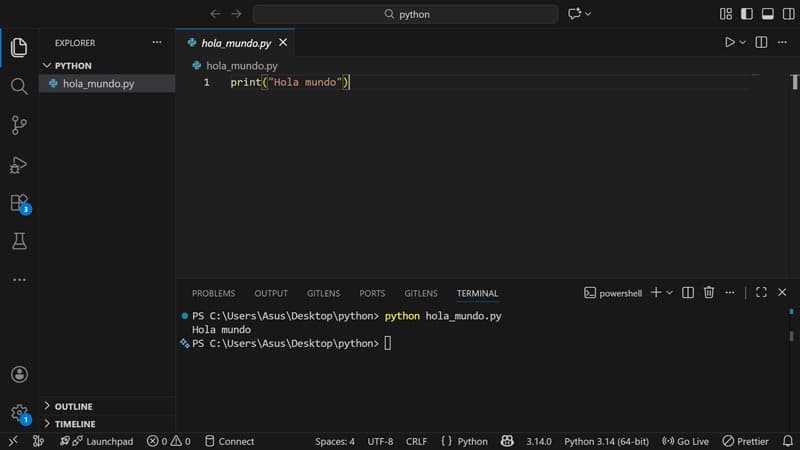 Running the Hello World program in Visual Studio Code
If you're having trouble navigating the terminal, you can create a folder for your Python projects and open that folder directly in Visual Studio Code. This way, the terminal will open in the correct directory, and you can run your files without having to navigate manually.
If everything is set up correctly, you should see "Hello, world!" printed in the console. Congratulations, you've just written your first Python program!

What can we do with Python?
Python is a very versatile programming language used in a wide variety of applications. Some of the things you can do with Python include:
-
Web Development: You can use frameworks like Django or Flask to create websites and web applications.
-
Data Analysis: Python is very popular in the field of data analysis and data science, with libraries like Pandas, NumPy, and Matplotlib.
-
Artificial Intelligence and Machine Learning: Python is widely used in the development of artificial intelligence and machine learning models, with libraries such as TensorFlow, Keras, and Scikit-learn.
-
Automation: You can use Python to automate repetitive tasks, such as file handling, web scraping, or automating tasks on your computer.
-
Game Development: With libraries like Pygame, you can create your own games in Python.
-
Desktop Application Development: You can use libraries like Tkinter or PyQt to create desktop applications with graphical interfaces.
In short, Python is a powerful and easy-to-learn programming language that can be used for a wide variety of purposes. As you progress in your Python learning, you will discover even more possibilities and applications for this versatile language.
What is the best way to learn Python?
The best way to learn Python is through consistent practice and building real-world projects. Here are some tips to help you learn Python effectively:
-
Start with the basics: Make sure you understand the fundamentals of Python, such as variables, data types, control structures, and functions.
-
Practice regularly: Consistent practice is key to learning any programming language. Try to write code every day, even if it's just for a few minutes.
-
Build projects: The best way to learn is by applying what you've learned to real-world projects. Start with small projects and then move on to more complex ones as you become more comfortable with the language.
-
Use online resources: There are many free online resources for learning Python, such as tutorials, courses, and official documentation. Take advantage of these resources to expand your knowledge.
-
Join the community: Participate in online communities, such as forums, social media groups, or collaborative learning platforms. This will allow you to connect with other learners and experienced developers, ask questions, and share your projects. You can join our community at discord.com/invite/pNST4gkgby to share your progress and learn alongside others.
Python installation types
There are two main ways to install Python, each suited for different needs:
-
Standard installation: You download the installer from python.org. It's the recommended option for beginners, as it includes the interpreter, IDLE (a basic editor), and pip (the package manager).
-
Distributions like Anaconda: Include Python plus hundreds of pre-installed packages for data science and machine learning. Recommended if you plan to work with data analysis, although it takes up more disk space.
Python also comes pre-installed on most Linux and macOS systems. To check, open a terminal and run python3 --version.
When installing Python on Windows, make sure to check the "Add Python to PATH" box during installation. This will allow you to run python from any terminal without path issues.
Next Steps
In the next chapter you'll learn about variables and data types in Python, where you'll discover how to store information and work with different data types like text, numbers, and boolean values.
Want to put what you learned to the test? Use DivZone AI to generate and test your own Python exercises.
-
Official Python website: python.org
-
Official Python documentation: docs.python.org
-
Python tutorials at W3Schools: w3schools.com/python/