Exercise 8: Create a complete layout mockup with header, body, and footer
Create a complete layout mockup with header, body, and footer, implementing HTML and CSS, based on the following image.
tip
The body should wrap the header, footer, and main section, for which you can use the tag<main>.
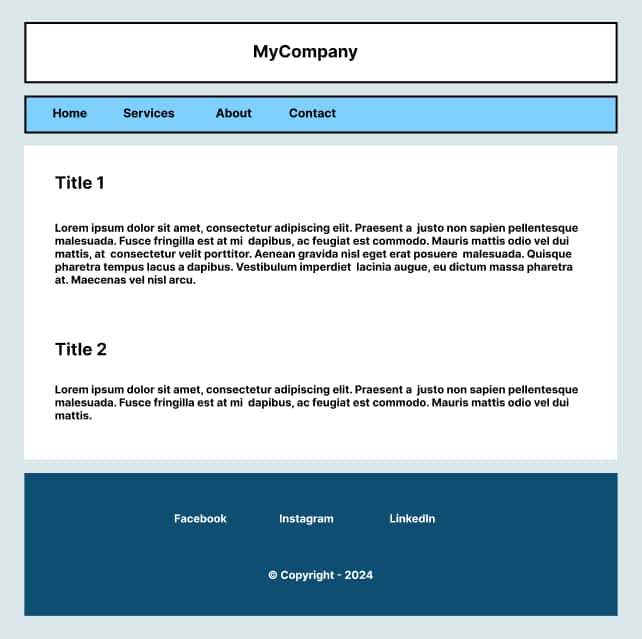
Interactive Solution

Solution with complete HTML and CSS code
HTML
<!DOCTYPE html>
<html lang="es">
  <head>
    <meta charset="UTF-8" />
    <title>Ejercicio 2</title>
    <style>
      /* Escribe tu CSS aquí */
      body {
        margin: 0; /* Quita el margen por defecto */
        font-family: sans-serif;
      }
      .container {
        width: 100%;
        box-sizing: border-box;
        margin: 0;
        padding: 32px;
        background: #e1d9ff;
        min-width: fit-content;
      }
      header {
        margin: 0 0 24px;
      }
      header .top_banner {
        width: 100%;
        box-sizing: border-box;
        margin: 0 0 16px;
        padding: 20px;
        border: 3px solid #000000;
        text-align: center;
        background: #fff;
      }
      header .top_banner span {
        font-size: 18px;
        font-weight: 800;
      }
      header .nav {
        width: 100%;
        box-sizing: border-box;
        border: 3px solid #000;
        background: #fff7e7;
      }
      header .nav ul {
        list-style: none;
        display: flex;
        gap: 20px;
        margin: 0; /*Quitamos el margen por defecto*/
        padding: 0 16px;
      }
      header .nav ul li a {
        display: block;
        text-decoration: none;
        font-size: 16px;
        color: #000; /*Utilizamos tres valores ya que es similar a utilizar #000000*/
        font-weight: 600;
        padding: 12px;
        transition: 0.3s; /*Esto produce un efecto suave cuando pasas el cursor por sobre el enlace*/
      }
      header .nav ul li a:hover {
        background: #fff;
      }
      main {
        margin: 0 0 24px;
      }
      main article {
        width: 100%;
        box-sizing: border-box;
        padding: 18px;
        background: #fff;
      }
      main article h2 {
        font-size: 20px;
        font-weight: 600;
        margin: 0 0 16px;
      }
      main article p {
        font-size: 14px;
        font-weight: 600;
      }
      footer {
        text-align: center;
        padding: 20px;
        background: #575261;
      }
      footer .footer_nav {
        width: 100%;
        box-sizing: border-box;
        margin: 0 0 20px;
      }
      footer .footer_nav ul {
        list-style: none;
        display: flex;
        justify-content: center;
        gap: 20px;
        margin: 0; /*Quitamos el margen por defecto*/
        padding: 0 16px;
      }
      footer .footer_nav ul li a {
        display: block;
        text-decoration: none;
        font-size: 16px;
        color: #fff; /*Utilizamos tres valores ya que es similar a utilizar #ffffff*/
        font-weight: 600;
        padding: 12px;
        transition: 0.3s; /*Esto produce un efecto suave cuando pasas el cursor por sobre el enlace*/
      }
      footer .footer_nav ul li a:hover {
        background: #6a6376;
      }
      footer span {
        font-size: 15px;
        font-weight: 700;
        color: #fff;
      }
    </style>
  </head>
  <body>
    <div class="container">
      <header>
        <div class="top_banner">
          <span>MyCompany</span>
        </div>
        <nav class="nav">
          <ul>
            <li><a href="" title="Link description">Home</a></li>
            <li><a href="" title="Link description">Services</a></li>
            <li><a href="" title="Link description">About</a></li>
            <li><a href="" title="Link description">Contact</a></li>
          </ul>
        </nav>
      </header>
      <main>
        <article>
          <h2>Title 1</h2>
          <p>
            Lorem ipsum dolor sit amet, consectetur adipiscing elit. Suspendisse
            commodo metus a sapien rhoncus tempor. Cras id viverra arcu. Quisque
            maximus elementum rhoncus. Suspendisse et luctus lectus. Duis
            vulputate a est hendrerit congue. Suspendisse scelerisque dolor nec
            lectus convallis fermentum. Phasellus ultricies orci et nulla
            blandit, sed mattis sem consectetur.
          </p>
        </article>
        <article>
          <h2>Title 2</h2>
          <p>
            Lorem ipsum dolor sit amet, consectetur adipiscing elit. Suspendisse
            commodo metus a sapien rhoncus tempor. Cras id viverra arcu. Quisque
            maximus elementum rhoncus. Suspendisse et luctus lectus. Duis
            vulputate a est hendrerit congue. Suspendisse scelerisque dolor nec
            lectus convallis fermentum. Phasellus ultricies orci et nulla
            blandit, sed mattis sem consectetur.
          </p>
        </article>
      </main>
      <footer>
        <nav class="footer_nav">
          <ul>
            <li><a href="" title="Link description">Facebook</a></li>
            <li><a href="" title="Link description">Instagram</a></li>
            <li><a href="" title="Link description">Linkedin</a></li>
          </ul>
        </nav>
        <span>© Copyright - 2025</span>
      </footer>
    </div>
  </body>
</html>
info
🔎Review the following sections where you will find more information on this topic: