Semantic HTML: What It Is and How to Use Semantic Tags in HTML5
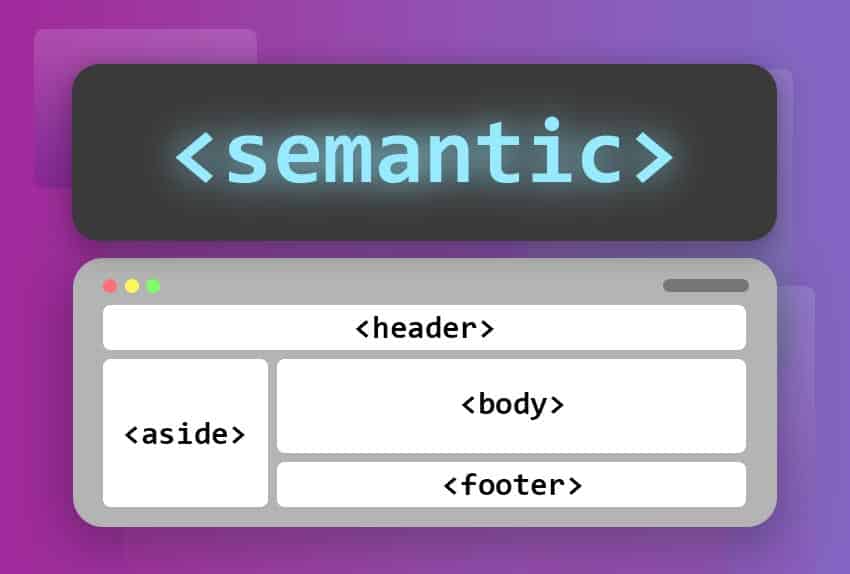
Discover what semantic HTML is and how to use tags like<header>,<main> and <footer>To give structure and meaning to your web pages with HTML5.
What is Semantic HTML?
Semantic HTML refers to the use of HTML tags that clearly describe the purpose and meaning of the content they contain. Unlike generic tags such as<div> and <span>Semantic tags provide additional information about the structure and type of content, improving accessibility, search engine optimization (SEO), and code maintainability.
Benefits of Semantic HTML
-
Improved Accessibility: Semantic tags make it easier for screen readers and other assistive devices to interpret content, improving the experience for users with disabilities.
-
Search Engine Optimization (SEO): Search engines use semantic structure to better understand a page's content, which can improve its ranking in search results.
-
Cleaner and More Maintainable Code: Using semantic tags makes code more readable and easier to maintain, as developers can quickly understand the structure and purpose of the content.
-
Improves the logical structure of pages.: Semantic HTML helps organize content logically, facilitating navigation and understanding for both users and developers.

Tags<header>,<nav>,<section> and <article>
Semantic tags in HTML5 help to better structure the content of a web page, making it more understandable for developers, browsers, and search engines. Below, we'll explore some of the most important semantic tags:<header>,<nav>,<section>,<article>, and <footer>
###<header>
The label<header>It is used to define the heading of a section or document. This heading can contain elements such as logos, titles, navigation menus, etc.
<!DOCTYPE html>
<html>
  <head>
    <title>Página de Ejemplo</title>
  </head>
  <body>
    <header>
      <h1>Bienvenido a Mi Sitio Web</h1>
      <nav>
        <ul>
          <li><a href="#inicio">Inicio</a></li>
          <li><a href="#sobre">Sobre Nosotros</a></li>
          <li><a href="#contacto">Contacto</a></li>
        </ul>
      </nav>
    </header>
  </body>
</html>
In this example, the<header>It contains a title and a navigation menu.
###<nav>
The label<nav>It is used to define a block of navigation links. It typically contains a main website menu or a set of links to other pages or sections of the site.
<!DOCTYPE html>
<html>
  <head>
    <title>Página de Ejemplo</title>
  </head>
  <body>
    <header>
      <h1>Bienvenido a Mi Sitio Web</h1>
      <nav>
        <ul>
          <li><a href="#inicio">Inicio</a></li>
          <li><a href="#sobre">Sobre Nosotros</a></li>
          <li><a href="#contacto">Contacto</a></li>
        </ul>
      </nav>
    </header>
    <section id="inicio">
      <h2>Inicio</h2>
      <p>Bienvenidos a nuestro sitio web.</p>
    </section>
    <section id="sobre">
      <h2>Sobre Nosotros</h2>
      <p>Somos una empresa dedicada a ...</p>
    </section>
    <section id="contacto">
      <h2>Contacto</h2>
      <p>Puede contactarnos a través de ...</p>
    </section>
  </body>
</html>
Here, <nav>It contains a list of navigation links that lead to different sections of the document.
<section>
###<section>
The label<section>It is used to define a section of a document. It can contain one or more headings and is intended to group related content.
<!DOCTYPE html>
<html>
  <head>
    <title>Página de Ejemplo</title>
  </head>
  <body>
    <header>
      <h1>Bienvenido a Mi Sitio Web</h1>
      <nav>
        <ul>
          <li><a href="#inicio">Inicio</a></li>
          <li><a href="#sobre">Sobre Nosotros</a></li>
          <li><a href="#contacto">Contacto</a></li>
        </ul>
      </nav>
    </header>
    <section id="inicio">
      <h2>Inicio</h2>
      <p>Bienvenidos a nuestro sitio web.</p>
    </section>
    <section id="sobre">
      <h2>Sobre Nosotros</h2>
      <p>Somos una empresa dedicada a ...</p>
    </section>
    <section id="contacto">
      <h2>Contacto</h2>
      <p>Puede contactarnos a través de ...</p>
    </section>
  </body>
</html>
In this example, each<section>It groups content that belongs to different sections of the website: Home, About Us, and Contact.
###<article>
The label<article>It is used to contain independent and self-contained content, such as articles, blog posts, comments, etc. Each<article>It must make sense on its own, even if it were taken from the document.
<!DOCTYPE html>
<html>
  <head>
    <title>Página de Ejemplo</title>
  </head>
  <body>
    <header>
      <h1>Bienvenido a Mi Blog</h1>
      <nav>
        <ul>
          <li><a href="#articulo1">Artículo 1</a></li>
          <li><a href="#articulo2">Artículo 2</a></li>
        </ul>
      </nav>
    </header>
    <section>
      <article id="articulo1">
        <h2>Primer Artículo</h2>
        <p>Este es el contenido del primer artículo.</p>
        <footer>Publicado por Juan el 1 de enero de 2024</footer>
      </article>
      <article id="articulo2">
        <h2>Segundo Artículo</h2>
        <p>Este es el contenido del segundo artículo.</p>
        <footer>Publicado por María el 2 de enero de 2024</footer>
      </article>
    </section>
  </body>
</html>
Here, every<article>This represents a standalone article with its own content and footer.
###<footer>
The label<footer>It is used to define the footer of a document or section. It typically contains information such as the document's author, links to terms of use, contact information, and more.
<!DOCTYPE html>
<html>
<head>
<title>Página de Ejemplo</title>
</head>
<body>
<header>
<h1>Bienvenido a Mi Sitio Web</h1>
<nav>
<ul>
<li><a href="#inicio">Inicio</a></li>
<li><a href="#sobre">Sobre Nosotros</a></li>
<li><a href="#contacto">Contacto</a></li>
</ul>
</nav>
</header>
<section id="inicio">
<h2>Inicio</h2>
<p>Bienvenidos a nuestro sitio web.</p>
</section>
<section id="sobre">
<h2>Sobre Nosotros</h2>
<p>Somos una empresa dedicada a ...</p>
</section>
<section id="contacto">
<h2>Contacto</h2>
<p>Puede contactarnos a través de ...</p>
</section>
<footer>
<p>© 2024 Mi Sitio Web. Todos los derechos reservados.</p>
<nav>
<ul>
<li><a href="#privacidad">Política de Privacidad</a></li>
<li><a href="#terminos">Términos de Uso</a></li>
</ul>
</nav>
</footer>
</body>
</html>
In this example, the<footer>It contains a copyright notice and a navigation menu with links to the privacy policy and terms of use.
In short, use of semantic tags such as<header>,<nav>,<section>,<article>, and <footer>HTML5 improves the accessibility and comprehension of content for both users and search engines. These tags provide a clear and meaningful structure to the document, allowing developers and browsers to better interpret the content and its purpose.
Additional Semantic Tags
In addition to the tags mentioned above, HTML5 introduces several other semantic tags that help structure content more effectively. Here are some of the most common:
###<aside>
The label<aside>It is used to contain content that is tangentially related to the main content. This can include sidebars, quotes, advertisements, or any other content that is not part of the document's main flow.
<aside>
  <h2>Noticias Relacionadas</h2>
  <p>Lee más sobre temas relacionados en nuestro blog.</p>
  <ul>
    <li><a href="#noticia1">Noticia 1</a></li>
    <li><a href="#noticia2">Noticia 2</a></li>
    <li><a href="#noticia3">Noticia 3</a></li>
  </ul>
</aside>
###<figure> and <figcaption>
The label<figure>It is used to encapsulate illustrative content, such as images, diagrams, photos, etc. The tag<figcaption>It is used to provide a legend or description for the content within<figure>
<figure>
  <img src="imagen-ejemplo.jpg" alt="Descripción de la imagen" />
  <figcaption>Esta es una leyenda que describe la imagen.</figcaption>
</figure>
###<main>
The label<main>It is used to encapsulate the main content of a document. There should only be one.<main>per page, and this should contain content that is unique and relevant to that page.
<main>
  <h1>Contenido Principal de la Página</h1>
  <p>Este es el contenido más importante de la página.</p>
</main>
###<mark>
The label<mark>It is used to highlight text that is relevant or important within a specific context.
<p>Este es un <mark>texto resaltado</mark> que llama la atención del lector.</p>
Conclusion
The use of semantic tags in HTML5 not only improves code structure and clarity, but also contributes to better accessibility and search engine optimization. By using tags such as<header>,<nav>,<section>,<article>,<footer>,<aside>,<figure>,<figcaption>,<main>, and <mark>Developers can create more organized and easier-to-understand web pages for both users and search engines.
By properly structuring your HTML with these tags, you not only make your code more readable and maintainable, but you also improve the user experience and search engine optimization (SEO). Remember that semantics matters, and the proper use of these tags can make a big difference in the quality and effectiveness of your website.
-
Common elements and tags: Elements and tags in HTML
-
Forms: Creating forms with HTML
-
More about semantic HTML: Wikipedia Semantic HTML.
🚧Learn by doing. Work through these basic exercises: